AI Account Manager
The AI Account Manager is SAIGE's always-on monitoring layer. It watches your Google Business Profile, every connected channel, and every automation; surfaces a regular progress digest; raises alerts when something needs your eyes; and quietly handles the rest. It's the difference between subscribing to a tool and having a teammate.
What it actually does
- Progress digest — what posts went live, how many reviews came in, where rankings moved
- Performance report on a regular cadence — the formal PDF version with heatmap snapshot and rank-deltas (see Configuring Automated Reports for cadence options)
- Real-time GBP-change alerts — Google suspensions, hours edits you didn't make, category changes, ranking-significant shifts
- Proactive reminders — pending approvals, drafted posts awaiting review, photo backlog running low, integrations that disconnected
- Quiet handling of the rest — when nothing needs your input, you hear nothing. The default mode is don't-bother-the-operator.
GBP-change alerts in detail
The alert engine watches for the events that matter for your local rankings. The most common categories:
- Profile suspended or under review — fires immediately, with suggested first steps
- Hours, category, or NAP edited externally — Google occasionally rewrites your fields based on user submissions or partner data; SAIGE catches and surfaces the edit so you can confirm or revert
- Significant ranking drop — a tracked keyword drops more than 3 positions in a short window
- Integration disconnected — Stripe / Square / CompanyCam / a connected social channel needs reauthorization
- Photo or post pipeline empty — your drip queue is running thin
Notification channels
Alerts and digests deliver via two channels by default: the email on your account and the in-product notification center on the SAIGE dashboard. Add a Zapier connection from your dashboard settings to route specific alert types to Slack, SMS, or any of the 7,000+ Zapier-connected apps.
Trust SAIGE vs. custom cadence
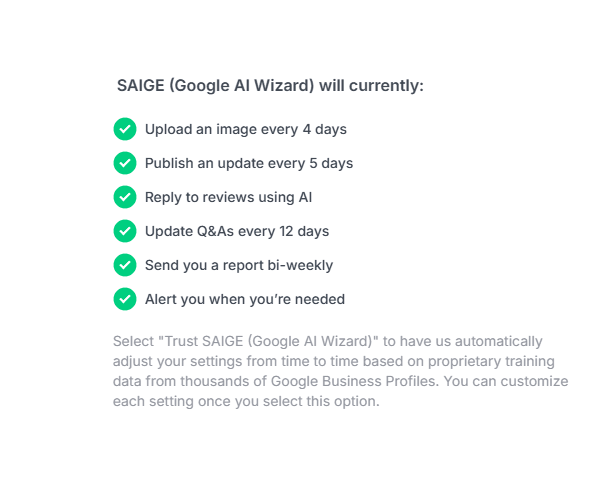
Most account-manager configuration ships with a Trust SAIGE option that uses the default cadence shown in the screenshot above. The defaults are tuned against the underlying SAIGE engine's measurement of what cadence drives signal without spamming you. If you want a quieter or louder rhythm, toggle off Trust SAIGE on the relevant automation and set a custom interval.
How it ties into Posts and Reviews approvals
If you run Posts or Review Management on Approval Required mode, the AI account manager surfaces each drafted post and reply for your sign-off. Approve from the notification, edit if needed, or auto-promote the automation to Fully Automated mode once you trust the drafts. See Posts → Approval workflow and Reviews → Configuring per-star reply modes for the per-automation controls.
Was this article helpful?
Your feedback helps us prioritize what to write next.